Please have your Amazon return boxed & labeled.
Boxed and labeled before you arrive is quickest — but if you haven’t printed the label, we can print it at the counter once your return is switched to a UPS Dropoff. Here’s how to set that up in the Amazon app in under a minute.
Three steps before you come in
We can’t print a label from an Amazon QR code yet. Switching your return to a labeled UPS Dropoff takes a moment, keeps it free, and gives us a label we can work with.
QR codes aren’t supported yet
Amazon QR codes are currently not compatible with our systems (we’re told coming soon).
We can still assist
Please cancel your return, then select one of the highlighted return options (see below) to avoid fees.
Choose UPS Dropoff
Select our location as a UPS Dropoff.
Pick the highlighted options
Reasons and options shown in orange keep the return free. The greyed-out reasons can carry a return shipping fee.
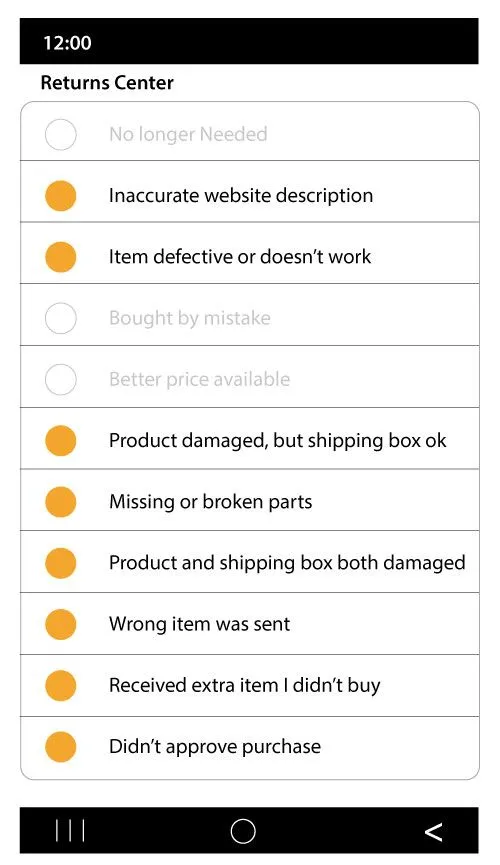
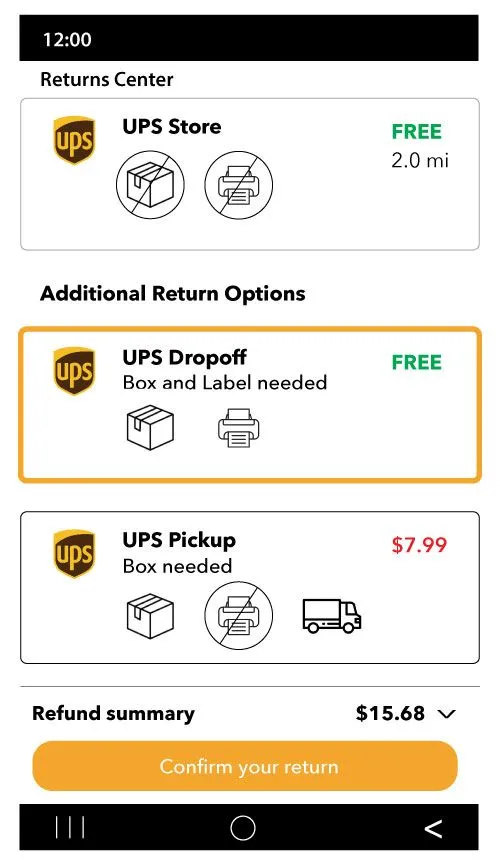
Screenshots from the Amazon app. Your screen may differ slightly by item and account.
Boxed, labeled, and ready? Come on by.
We’re at 1610 S 31st St, Ste 102 in Temple — open six days a week. Hand it over the counter and you’re done.